


LEGO® Play
4.5748.00 Reviews
App Specs
- Version
- 2026.6.3
- Updated On
- License
- Free
- Downloads
- 10,000,000+
- Developer
- LEGO System A/S
- Categories
- Entertainment
- Platform
- Android, iOS
Screenshots

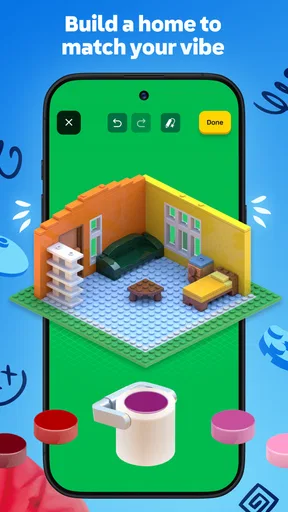
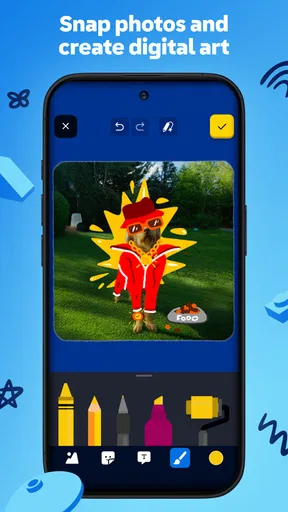

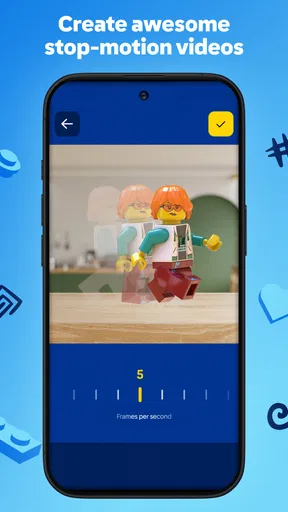

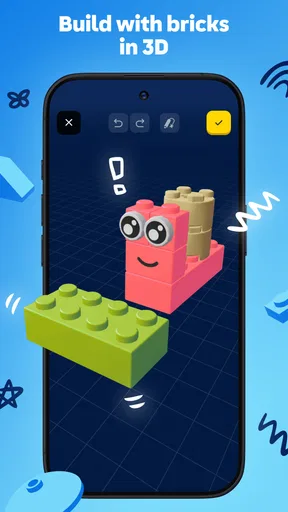
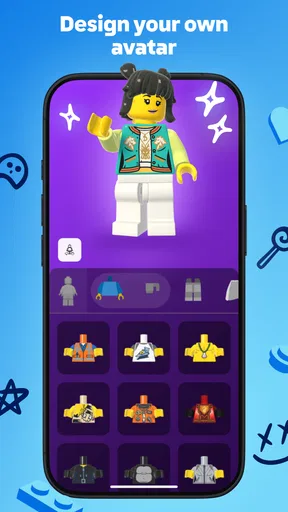
 Analysis by AppCompare
Are you ready to dive into a world where creativity knows no bounds? If you're a fan of building blocks and imaginative play, then LEGO® Play is about to become your new best friend. I recently spent some quality time with this app, and trust me, it’s as fun as it sounds. So, let's break it down and see what makes this app a must-have for both kids and adults alike.
Where digital play fits into a LEGO afternoon
I see the best use for LEGO® Play as a change of pace rather than a replacement for physical bricks. A child who has just finished building a model can use a creative app session to continue imagining what happens next; an adult can use it as a low-pressure prompt when the familiar box of bricks is sitting on the table and inspiration has stalled. That distinction matters: the appeal is not that a screen can reproduce the feel of sorting and snapping together real pieces, but that it offers another route into playful ideas.
For a realistic everyday example, picture a short wait before dinner. Instead of opening a fast, competitive game, a parent and child could take turns inventing a character or imagining what a LEGO scene might look like, then carry that idea over to a real build later. I would keep the session small and let the child choose the direction. Creative play tends to work better when the adult supplies a starting point, not a finished plan.
One practical way to get more from the experience is to treat a prompt as a starting constraint. If a challenge suggests a subject, try making the idea funny, unusual, or connected to something the child saw that day rather than aiming for a polished result. This turns a simple activity into a chance to explain choices: why a character needs a certain tool, how a vehicle might move, or what could happen in the next part of a story.
It is also worth separating screen-based inspiration from hands-on building time. If a child becomes absorbed in browsing or tapping through activities, suggest a natural stopping point and ask them to sketch or build one idea afterward. That small handoff gives the digital session a purpose and helps avoid treating screen time as the only form of play. For adults, the same approach can make the app useful as a quick creative warm-up rather than another place to spend an entire evening.
Getting Started with LEGO® Play
First things first, downloading LEGO® Play was a breeze. Available for both Android and iOS, the app is just a few taps away in your app store. Once you fire it up, you're greeted by a vibrant, kid-friendly interface that feels like stepping into a colorful LEGO world. It's intuitive and easy to navigate, making it suitable even for the youngest builders.
Features That Spark Creativity
Now, onto the features, which are the heart and soul of this app. One of the coolest aspects of LEGO® Play is the vast collection of building challenges and activities. Whether you're piecing together a spaceship or creating your own cityscape, there's something for everyone.
Worth Reading Before You Choose

Baby Panda World Brings Quick Play to Modern Phones, but Its Game Library Feels Busy

ESPN’s Live Game View Makes Following Close Games Easier

QuizzLand Review: A Good Fit for Short Trivia Breaks, Not Every Player

Basketball Stars: Multiplayer Is Fast, but Can It Recover When Matches Go Wrong?

WEBTOON Turns Phone Updates Into a Better Reading Routine

Link to Windows Runs on Shared Habits, Not Social Feeds
- Daily Challenges: These are bite-sized tasks that push your creativity to new limits. It's a great way to start your day with a little brain teaser.
- Virtual Building: With a plethora of bricks at your fingertips, you can let your imagination run wild without the fear of stepping on a rogue piece!
- Mini-Games: Need a break from building? Dive into a selection of mini-games that are just as engaging and fun.
Each feature is designed to encourage creativity and problem-solving in a fun, interactive way. The app is constantly updated with new challenges, so there's always something fresh to try.
Making creative activities work for different ages
The broad age appeal is a strength, but it does not mean every activity will suit every child equally. Younger children may enjoy choosing and exploring more than following a multi-step idea, while older kids may want to put their own twist on a prompt instead of completing it exactly as presented. I would let the child’s interest determine how long to stay with an activity; there is little value in turning a playful task into a lesson they feel obliged to finish.
Parents wondering whether they need to build alongside their child can start by joining for the first few minutes, then step back once the child has a direction. Asking “what happens next?” or “what would make this work?” encourages imagination without taking over. If a child prefers quiet independent play, the app can still serve as a source of ideas, but it may not hold their attention as well as physical bricks or a shared activity.
Compared with a general creative or drawing app, the LEGO identity gives the play a recognizable building-and-storytelling frame. Compared with a traditional mobile game, the value is less about winning and more about generating ideas. That makes it a better fit for someone looking for playful inspiration than for someone seeking a deep construction simulator, an open-ended art studio, or a game with a clear progression to master.
Immersive Learning Experience
One of the standout aspects of LEGO® Play is its educational value. It’s not just about building; it’s about learning. The app sneaks in educational elements that teach kids about engineering, physics, and design principles without them even realizing it. It's like hiding veggies in your kid’s favorite meal—it’s that clever!
"This app is a brilliant blend of fun and learning, making playtime productive."
The app also features storytelling elements, where kids can create their own narratives, fostering language and communication skills. It's a comprehensive package that parents will love just as much as their kids.
A useful balance, with realistic limits
I would describe the learning value as informal: children can practice explaining an idea, changing a plan, or thinking about how parts fit together through play. That is different from a structured course, and it is a reason not to expect lessons, assessments, or a substitute for hands-on making. If your main goal is to teach a specific engineering concept in a deliberate sequence, a dedicated learning resource may be a better choice.
The app’s breadth can also be a trade-off. A child who wants only to build may not care for other kinds of activities, while someone drawn to mini-games may move quickly between them without developing one idea. I find it helps to agree on a simple goal before opening the app: make one imaginative scene, explore one prompt, or tell a short story. A modest aim can make the session feel satisfying without demanding that every part of the app appeal at once.
Families may also want to decide together how digital play fits into their routines. LEGO® Play works best as one option among drawing, physical building, reading, and outdoor play—not as a promise that every child will stay creatively engaged for the same amount of time. If a child is frustrated by navigating a screen or would rather manipulate real pieces, switching activities is sensible rather than a sign that they are using it incorrectly.
Community and Sharing
What's play without sharing? LEGO® Play includes a community feature where builders can share their creations and get inspired by others. It's a safe space for creativity to flourish, with a focus on positive interactions.
Joining the community allows users to:
- Share Creations:
- Upload your masterpieces and get feedback from other LEGO enthusiasts.
- Get Inspired:
- Browse creations from around the world and pick up new ideas for your next project.
It’s a great way to connect with like-minded individuals and learn from each other’s creativity.
Choosing how to share
Sharing can be motivating for a child who enjoys showing a finished idea, but it is not necessary for the app to be worthwhile. I would treat it as an optional extension of play, not the main reason to install it. A child who prefers keeping creations private can still use the creative activities without making community participation the goal.
For younger users, a parent should be part of decisions about posting and interacting. It is sensible to look through the sharing experience together and agree on what feels comfortable before a child contributes anything. The broader lesson is useful beyond this app: praise the thought behind a creation, not just how it looks or whether other people respond. That keeps the focus on experimentation instead of approval.
Who will get the most from it
LEGO® Play is most appealing to families who already enjoy LEGO-inspired pretend play and want a screen-based spark for stories and building ideas. It can also suit a child who likes switching between different kinds of creative activity, or a parent looking for a friendly way to join in without needing to invent every prompt themselves. LEGO System A/S is the developer, and the app is free, which makes it easy to try as an occasional addition to a family’s play options.
The audience figures suggest that it has reached a broad group: it has more than ten million installs and an average rating of 4.1 from around eighteen thousand ratings. Those numbers may help set expectations about its popularity, but they do not tell you whether a particular child will enjoy its style. I would make that decision based on whether they like guided prompts, imaginative play, and moving between activities, rather than assuming that a large audience means it will suit everyone.
There are clear reasons to skip it. If you are looking for a serious 3D building tool, a quiet app with no activity switching, a conventional action game, or a substitute for a box of physical LEGO bricks, this is unlikely to be the right match. It is also less compelling for a child who resists screen interfaces or prefers open-ended play with tangible materials. In those cases, a physical build, paper-and-pencil design, or a specialist creative app may better fit what they want.
Final Thoughts
So, is LEGO® Play worth the download? Absolutely! It's a delightful blend of creativity, fun, and learning that's suitable for all ages. Whether you're a seasoned LEGO builder or just getting started, this app has something to offer. It's a digital playground where imagination is the only limit.
In short, LEGO® Play is more than just an app; it's an experience. One that keeps you coming back for more, eager to see what you can create next. So, grab your virtual bricks and start building your dreams, one block at a time!
My verdict for a first try
My recommendation is enthusiastic but specific: try it if you want a playful, LEGO-flavored way to prompt imagination, especially when you can connect an on-screen idea to a story or a real-world build. The app is free, rated for Everyone, and its current version is 2026.4.0, with Android 7.0 as the minimum operating-system requirement. It was released on June 15, 2024, and its 678 written reviews sit alongside that much larger pool of ratings.
I would not approach it expecting every activity to become a lasting hobby or every child to respond the same way. Its strongest role is as a flexible creative companion: useful for a short burst of inspiration, a shared parent-child moment, or a prompt that leads back to hands-on play. If that is what you want, it is an easy app to consider. If you want depth in one particular craft or a screen-free building experience, choose the alternative that serves that aim directly.
Pros
- Engaging for all ages
- Regular updates and new content
- Safe
- kid-friendly environment
- Encourages creativity and learning
- Intuitive interface
Cons
- Requires internet connection
- Limited free content
- Some features need paid subscription
- Can be resource-intensive
- In-app purchases may add up
FAQs for LEGO® Play
What is LEGO® Play and how does it work?
LEGO® Play is a creative mobile application designed for both Android and iOS users. It allows users to explore and build virtual LEGO sets using a variety of interactive tools. The app provides a digital environment where users can follow guided builds or unleash their creativity in free play mode. It's a fun way to experience the joy of LEGO building without the physical pieces.
Is LEGO® Play suitable for children, and what age group is it best for?
LEGO® Play is designed for users of all ages, but it is particularly popular among children aged 6 and up. The app features intuitive controls and engaging content that are well-suited for young builders. Parental controls are also available to ensure a safe and age-appropriate experience, making it suitable for family use.
Does LEGO® Play require an internet connection to function?
While LEGO® Play can be enjoyed offline in free play mode, some features, such as downloading new sets or accessing community builds, do require an internet connection. To fully experience all the app has to offer, including updates and new content, an active internet connection is recommended.
Are there any in-app purchases or subscriptions in LEGO® Play?
LEGO® Play offers a free-to-play experience with optional in-app purchases. These purchases may include exclusive content, additional building sets, or customization options. While the app can be enjoyed without spending money, these purchases enhance the experience for those looking to expand their virtual LEGO collection.
How does LEGO® Play ensure user privacy and data security?
LEGO® Play is committed to protecting user privacy and data security. The app complies with international privacy standards and regulations. It collects minimal personal data, and any data collected is used solely to improve user experience. Parents can set up accounts to monitor their children's usage and ensure their safety while using the app.


